DeltaFlute writes, "I post my backgrounds using the script you write, but they look overblown. I'm using minima. I've tried to make adjustments but nothing looks right? Am I doing something wrong? Thanks."
Response,
My guess would be that it is something in your screen settings. Monitors (and their settings) may vary.
Also see the comments on this post for more help...
Showing posts with label FAQ. Show all posts
Showing posts with label FAQ. Show all posts
Take Me With You
I made some take along buttons to put on your blog! They don't blink. Enjoy!
SMALL (1x1 in):

BIG (2x2 in)
SMALL (1x1 in):
BIG (2x2 in)
Oops! Bandwidth Exceeded!
So sorry about the weird pictures popping up where my pictures, backgrounds and blinkies are supposed to be. It seems I've become too popular and together we all exceeded the free limit of bandwidth offered by Photobucket. I've since upgraded to pro. However, I have to pay for pro - so any donations are greatly appreciated (the yellow button on the right sidebar)! You can also advertise on here.
Also, please please please let me know if anything isn't working right for you. I want to be able to fix any problems as soon as I can. Thanks!
Also, please please please let me know if anything isn't working right for you. I want to be able to fix any problems as soon as I can. Thanks!
DON'T STEAL
I am flattered at all the blogs I see popping up with my backgrounds, headers and blinkies. I try to credit the digi-scrappers from which I get my digital scrapbooking stuff (you'll see them in the individual posts).
I offer my backgrounds for free, and in return I ask that you please:
1) Keep my links in tact.
2) Go ahead and blog about me, and link back to me. But DON'T steal my backgrounds as your own ideas.
3) DO NOT copy my backgrounds and post them FOR SELL on your own site OR ANYWHERE. This is the ultimate offense to me. I am flabbergasted that anyone would do this... but it's really is happening...
-------
Here's a reminder of the rules / Terms of Use for using my Backgrounds, Headers and Blinkies (the ones that are always posted plain as day on this site):
1. Use for personal or commercial blog use.
2. DON'T claim them as your own, DON'T sell them, DON'T give them away under another name.
3. Dont' Hotlink, or practice Bandwith Theft.
4. Leave my logo and links in tact.

Blogger Backgrounds and Headers by Dotty Dot Dot Designs is licensed under a Creative Commons Attribution-Noncommercial-Share Alike 3.0 United States License.
*Use my stuff, but don't steal my stuff. IE... Don't sell it or offer it for goods or services on others sites.
I offer my backgrounds for free, and in return I ask that you please:
1) Keep my links in tact.
2) Go ahead and blog about me, and link back to me. But DON'T steal my backgrounds as your own ideas.
3) DO NOT copy my backgrounds and post them FOR SELL on your own site OR ANYWHERE. This is the ultimate offense to me. I am flabbergasted that anyone would do this... but it's really is happening...
-------
Here's a reminder of the rules / Terms of Use for using my Backgrounds, Headers and Blinkies (the ones that are always posted plain as day on this site):
1. Use for personal or commercial blog use.
2. DON'T claim them as your own, DON'T sell them, DON'T give them away under another name.
3. Dont' Hotlink, or practice Bandwith Theft.
4. Leave my logo and links in tact.
Blogger Backgrounds and Headers by Dotty Dot Dot Designs is licensed under a Creative Commons Attribution-Noncommercial-Share Alike 3.0 United States License.
*Use my stuff, but don't steal my stuff. IE... Don't sell it or offer it for goods or services on others sites.
Sponsor Dotty Dot Dot
1) Sponsored Ad Space
A visual ad that can link to your site.
2) Sponsored Reviews and Giveaways
Give away stuff!
Please contact ashblog (at) hotmail (dot) com
A visual ad that can link to your site.
2) Sponsored Reviews and Giveaways
Give away stuff!
Please contact ashblog (at) hotmail (dot) com
Fitting the Header
Headers are different sizes for 2-Column and 3-Column layouts
Adjusting a Header Using the Template Designer
After you have installed your Background and uploaded your Header go to:
Template > Customize > Adjust Widths > Entire Blog Width
Play with the width until it looks right. (It will be about 660px for a 2-Column and about 940px for 3-Column)
My "Stylized Header" is not cut-out like it's supposed to be
DON'T click "shrink to fit" when uploading a "stylized header" (they are .PNG). The rectangle headers (.JPG) may be shrunk to fit just fine.
Read about using different sized BACKGROUNDS on different sized layouts, here.
- 2-Column Headers are 660px wide
- 3-Column Headers are 940px wide
After you have installed your Background and uploaded your Header go to:
Template > Customize > Adjust Widths > Entire Blog Width
Play with the width until it looks right. (It will be about 660px for a 2-Column and about 940px for 3-Column)
My "Stylized Header" is not cut-out like it's supposed to be
DON'T click "shrink to fit" when uploading a "stylized header" (they are .PNG). The rectangle headers (.JPG) may be shrunk to fit just fine.
Read about using different sized BACKGROUNDS on different sized layouts, here.
How to Personlize a Header
You may want to edit something onto the Header before uploading it on to your blog.
Use any photo editing programs such as Photoshop, Adobe Photoshop Elements, Paint, Corel Paint, PhotoSuite, Google Picasa, FotoFinish Suite, Photo Explosion, Photo Studio... Here are some consumer review sites for photo editing software (as of 5/2009): Consumer Search, Top 10 Reviews. It's easy enough to do a Google search for "photo editing software".
You'll find two Header styles on this site;
Personalizing a Header, step-by-step:
*If you want a Header personalized, I will do it for $5. Email me; ashblog (at) hotmail (dot) com. [see examples below]---->


Here are some more examples of personalized headers.
Use any photo editing programs such as Photoshop, Adobe Photoshop Elements, Paint, Corel Paint, PhotoSuite, Google Picasa, FotoFinish Suite, Photo Explosion, Photo Studio... Here are some consumer review sites for photo editing software (as of 5/2009): Consumer Search, Top 10 Reviews. It's easy enough to do a Google search for "photo editing software".
You'll find two Header styles on this site;
- Rectangle Headers (Usually .jpg format.)
- Stylized Headers (They look transparent, or "see-through" and are usually .png format.)
Personalizing a Header, step-by-step:
- In the blog post, click on the picture of the Header to open it bigger in a new window
- Right click on the picture
- Save it
- Open a photo editing program
- Erase my text [by using the Eraser tool in the program you are using. I know Photoshop has an eraser tool. Also - Paint doesn't like .png's, just so ya know.]
- Add your own text
- Save the Header (save it as the same format as it came [the formats for Headers you'll find on this site are either .jpg or .png])
- Upload the new edited Header to your Blog
*If you want a Header personalized, I will do it for $5. Email me; ashblog (at) hotmail (dot) com. [see examples below]---->


Here are some more examples of personalized headers.
Fitting the Background on the Layout
I Am Using Blogger's Template Designer
To adjust your blog's width to make it skinnier or wider;
Template > Customize > Adjust Widths > Entire Blog Width
Play with the width until it looks right. (It will be about 660px for a 2-Column and about 940px for 3-Column)
I Am Using an Older Version of Blogger and I have a 2-Column Layout...
Any 2-Column or 3-Column layout found on Dotty Dot Dot FREE Blogger Backgrounds will fit.. 2-Column Backgrounds will have a tighter fit on a 2-Column layout. 3-Column Backgrounds are extra wide, but they still look good on a 2-Column layout.
I Am Using an Older Version of Blogger and I have a 3-Column Layout...
Any of the wider 3-Column Backgrounds should fit. BUT 2-Column backgrounds are too small for the wider 3-Column layouts. *If you don't have a 3-Column layout, but you want one, use these instructions.
Read about using different sized HEADERS on different sized layouts, here.
To adjust your blog's width to make it skinnier or wider;
Template > Customize > Adjust Widths > Entire Blog Width
Play with the width until it looks right. (It will be about 660px for a 2-Column and about 940px for 3-Column)
I Am Using an Older Version of Blogger and I have a 2-Column Layout...
Any 2-Column or 3-Column layout found on Dotty Dot Dot FREE Blogger Backgrounds will fit.. 2-Column Backgrounds will have a tighter fit on a 2-Column layout. 3-Column Backgrounds are extra wide, but they still look good on a 2-Column layout.
I Am Using an Older Version of Blogger and I have a 3-Column Layout...
Any of the wider 3-Column Backgrounds should fit. BUT 2-Column backgrounds are too small for the wider 3-Column layouts. *If you don't have a 3-Column layout, but you want one, use these instructions.
Read about using different sized HEADERS on different sized layouts, here.
How to Install a Dotty Dot Dot Background / Header
HOW TO INSTALL A BACKGROUND:

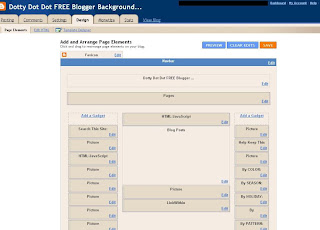
NOTES:
-----------------------------------------------------------------------------------------------
HOW TO INSTALL A HEADER: Some of the backgrounds have matching Headers (if they do, you'll see them right there in the same post body). Here's how to use them:
The headers are different sizes for 2-Column and 3-Column layouts
*Read this if your Header doesn't quite fit right.
*This is how to personalize your own Header.
NEW BLOGGER DASHBOARD & INTERFACE:
- Choose a background.
- Copy all of the Background's code.
- Go to Layout. (on your left nav bar)
- Click "Add a Gadget".
- Choose to add an "HTML/Javascript" gadget.
- Paste your Dotty Dot Dot background code in that dialogue box.
- After you save it, you may move that box wherever you like in your Layout tab - and it should be easy to remove by clicking "edit" on the gadget box containing the code.
- Go to to Template (on your left nav bar)
- Scroll down to Picture Window
- Choose the blue square
- Ta-Da! You have a new background!
*While on the "Template" page click "Customize" to change font colors, blog width, etcetera...
*The background may not show up in the preview on your Interface, but IT IS THERE! See the Preview or go to your actual blog URL to make sure.
OLD BLOGGER INTERFACE (pre 2011):
- Choose a background.
- Copy all of the Background's code.
- Go to your "Design" TAB. (not the "Template Designer"- if you're in the TD, hit the "back to Blogger" button (in the top right corner) and you'll return to your Blogger Dashboard "Add and Arrange Page Elements" area on the "Design" tab which is where you can add your cute and fun FREE background from this site (and add headers and other gadgets)
- Click "Page Elements".
- Click "Add a Gadget".
- Choose to add an "HTML/Javascript" gadget.
- Paste your Dotty Dot Dot background code in that dialogue box.
- After you save it, you may move that box wherever you like in your Layout tab (even to the bottom) - and it should be easy to remove by clicking "edit" on the gadget box containing the code.
- Ta-Da! You have a new background!
NOTES:
- If the pictures appear fuzzy on this site, it's because I compressed them in these blog posts. It will not be fuzzy when you add it to your site.
- WITH THE NEW BLOGGER TEMPLATES [using Blogger's Template Designer]: "Picture Window" (blue square) or "Awesome Inc" or "Travel" . (the background code DOES NOT go in your HTML template code - it is installed as a Gadget)
- WITH THE RETIRED BLOGGER TEMPLATES (launched 2006): You can still find "Minima White" if you go to your "Design" TAB > "Edit HTML" > scroll down to "Old Templates" > "Select Layout Template" > "Minima White".
-----------------------------------------------------------------------------------------------
HOW TO INSTALL A HEADER: Some of the backgrounds have matching Headers (if they do, you'll see them right there in the same post body). Here's how to use them:
- Click on the Header to get it Full-Sized in a new window.
- Right Click on the Picture.
- Save it to Your Computer.
- Use a picture editing program (like Photoshop) to add your personal touch.
- In Layout, click "Edit" in the "Configure Header" Box. (At the top..under the Navbar, above all the other boxes).
- Unclick "shrink to fit" when uploading a "stylized header" (they are .PNG). The rectangle headers (.JPG) may be shrunk to fit just fine, if needed.
- Upload the Header!
The headers are different sizes for 2-Column and 3-Column layouts
- 2-Column Headers are 660px wide
- 3-Column Headers are 940px wide
*Read this if your Header doesn't quite fit right.
*This is how to personalize your own Header.
**If you want a Header personalized by me, I will do it for $5. Email me; ashblog (at) hotmail (dot) com.


How to Make a 3-Column Layout - AND- Adjusting The Margins of Your 3-Column Layout
To make a 3-Column layout, I used these two articles from Three Column Blogger:
You need to do both of them:
1) Three Coulmn Minima Layout Version
2) Adjusting Three Column Margins
*(1-2012) This information is pre-Template Designer .
To adjust the width of the layout using the Template Designer:
After you have installed your Background and uploaded your Header go to:
Template > Customize > Adjust Widths > Entire Blog Width
Play with the width until it looks right. (It will be about 660px for a 2-Column and about 940px for 3-Column)
You need to do both of them:
1) Three Coulmn Minima Layout Version
2) Adjusting Three Column Margins
*(1-2012) This information is pre-Template Designer .
To adjust the width of the layout using the Template Designer:
After you have installed your Background and uploaded your Header go to:
Template > Customize > Adjust Widths > Entire Blog Width
Play with the width until it looks right. (It will be about 660px for a 2-Column and about 940px for 3-Column)

